Software Development Process

Hiển thị các bài đăng có nhãn Google Drawing. Hiển thị tất cả bài đăng

Google Drawing

 tháng 5 04, 2018     Global Connections, Google Drawing, Grade 6     No comments   

Creating Infographics for the Sustainable Development Goals

Students in Ms. Stewart's grade 6 class have been studying and researching the Sustainable Development Goals.  As part of their investigation, students were tasked with writing an informative essay based on their findings and creating an infographic to visually represent the data they found.
Students searched the internet for "free" images and then used Google Drawing to create these attractive posters. Using Google Drawing, students inserted and modified images, text fields and backgrounds.  Students learned to arrange objects on the page and group them appropriately. 
Check out these impressive images:
Grade 6 Creating Infographics
Technology Essential Questions:

How can technology be used to enhance a project and communicate knowledge?
How can we use this software to create original, innovative works and ideas?
How can this digital tool help us create a project that sparks curiosity?

2016 Massachusetts Digital Literacy and Computer Science (DLCS) Curriculum Framework:
6-8.DTC.a.1-3; 6-8.DTC.b.1; 6-8.DTC.c
Read More
  • Share This:  
  •  Facebook
  •  Twitter
  •  Google+
  •  Stumble
  •  Digg

Grade 4

 tháng 3 02, 2018     Collaboration, Google Drawing, Grade 4     No comments   


Renewable Energy Infographics in Ms. Davis's
Grade 4 Science Classes

4th Grade scientists in Ms. Davis's classes used Google Drawing to create infographics about renewable energy sources.

Some students worked collaboratively in small groups to create an infographic as a team.  Other students worked independently.  In both cases everyone used their understanding of renewable energy sources, their research skills and their technical skills to create these masterpieces:


Way to go 4th graders!


Technology Essential Questions:
How does this digital tool help improve collaboration and/or communication?
How can technology be used to enhance a project and communicate knowledge?
How can we use this software to create original, innovative works and ideas?

2016 Massachusetts Digital Literacy and Computer Science (DLCS) Curriculum Framework:
3-5.CAS.a.1; 3-5.CAS.b; 3-5.DTC.a; 3-5.DTC.b; 3-5.DTC.c.2; 3-5.DTC.c.3


Read More
  • Share This:  
  •  Facebook
  •  Twitter
  •  Google+
  •  Stumble
  •  Digg

Grade 3 Google Drawing

 tháng 2 16, 2018     Google Drawing, Grade 3     No comments   

Mrs. Holt's Grade 3, Google Drawings and a Spotlight in the Tri Town Transcript

Third grade students in Mrs. Holt's classroom are continuing to sharpen their skills with Google Drawing.  Last week they created "Opinion Posters" about which animal makes the best class pet.  Lucky for them, Wendall Waters, a reporter from the Tri Town Transcript stopped by to check out their terrific digital projects.

Here is the link to the newspaper article:
"Up in the Cloud: Boxford Third-graders Become Digital Citizens"

Way to go future-ready learners!


3rd Grade & Google Drawing

Technology Essential Questions:
How can technology be used to enhance a project and communicate knowledge?
How can we use this software to create original and innovative projects?
How do I use the ideas/images of others legally?
Are there some ideas/images I just cannot re-use?
What can students do to keep themselves safe when working online?

2016 Massachusetts Digital Literacy and Computer Science (DLCS) Curriculum Framework:
3-5.CAS.a.1; 3-5.CAS.b; 3-5.DTC.a; 3-5.DTC.b; 3-5.DTC.c.2; 3-5.DTC.c.3

Read More
  • Share This:  
  •  Facebook
  •  Twitter
  •  Google+
  •  Stumble
  •  Digg

Grade 3 Google Drawing

 tháng 2 15, 2018     Google Drawing, Grade 3     No comments   

Biographies, Facebook and Google Drawing:
Innovation in Grade 3!

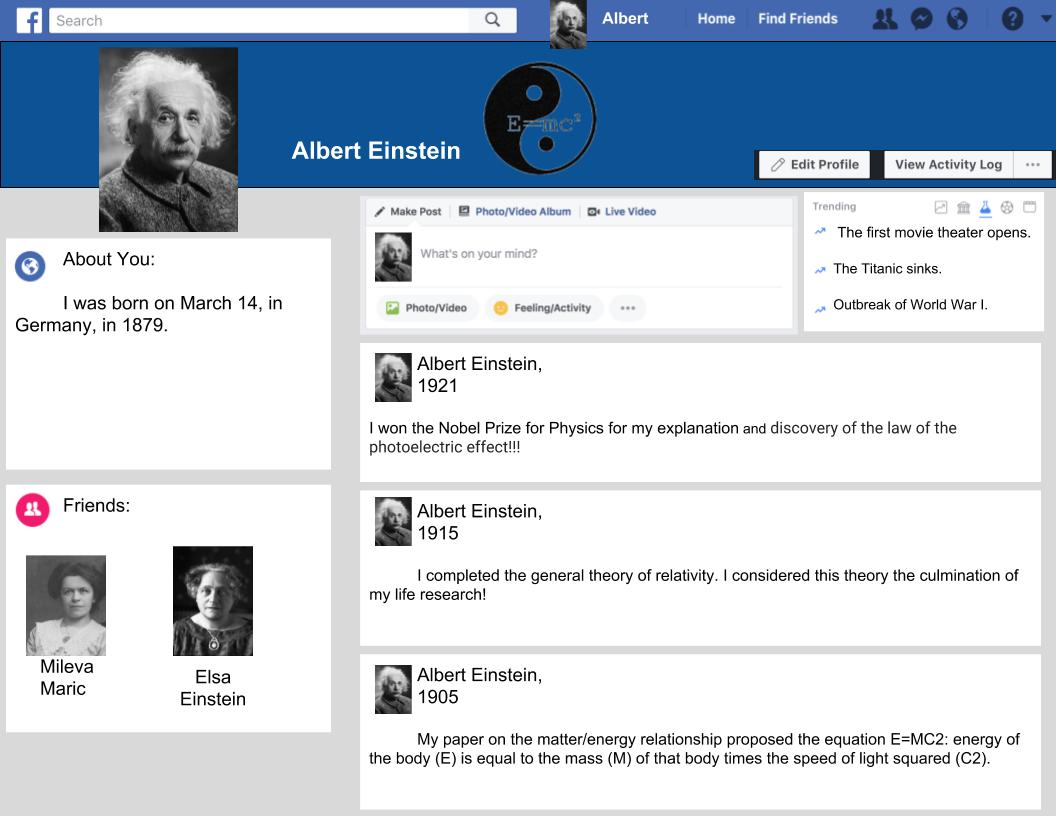
Mrs. Holt's third graders have been reading biographies.  As a culminating project, students were asked to choose a famous person, read their biography and then create a Facebook page as if they were that individual.
Students used Google Drawing to create their Facebook pages.  Important skills like inserting text and images were in full use.  Students also had to arrange items on the page and be sure to use only items that are labeled for re-use.  Students created posts using that person's voice and included topics that may have been trending in their lifetime.
3rd graders had a great time creating Facebook pages for individuals like Harry Houdini, Amelia Earhart, Helen Keller and Albert Einstein.

Check out their finished projects:
By Z.C.
By C.H.

By L.D.

By Z.C.


Technology Essential Questions:
How can we use this software to create original and innovative projects?
Why are exploration and creation an important part of learning?
How can this technology be used to enhance this biography project and communicate knowledge?
What basic skills should students know about this digital tool?

2016 Massachusetts Digital Literacy and Computer Science (DLCS) Curriculum Framework:
3-5.CAS.a.1; 3-5.CAS.b; 3-5.DTC.a; 3-5.DTC.b; 3-5.DTC.c.2; 3-5.DTC.c.3
Read More
  • Share This:  
  •  Facebook
  •  Twitter
  •  Google+
  •  Stumble
  •  Digg

Google Drawing

 tháng 1 14, 2018     Google Drawing, Grade 3, Online Research     No comments   

Grade 3 Gets Creative with Google Drawing


Mrs. Holt's 3rd grade classroom recently completed their study of the regions of Massachusetts.  As a culminating project, students were asked to choose a region and based on their knowledge of the area create a digital poster that might draw families with young children to investigate the area.

Students searched the internet for "free" images and then used Google Drawing to create these attractive posters.  Using Google Drawing, students inserted and modified images, text fields and backgrounds.  Students learned to arrange objects on the page and group them appropriately.  Completed posters were submitted to their teacher using Google Classroom.

Way to go grade 3!
What an awesome display of digital design skills!


Some new vocabulary students learned in this lesson:

Grade 3 Hard at Work

Google Drawing Essential Questions:
How can technology be used to enhance a project and communicate knowledge?
How can we use this software to create original, innovative works and ideas?
Are there technological solutions or enhancements to supplement what is being taught?
Why are exploration and creation an important part of learning?

2016 Massachusetts Digital Literacy and Computer Science (DLCS) Curriculum Framework:
3-5.CAS.a.1; 3-5.CAS.b; 3-5.DTC.a.2; 3-5.DTC.a.3; 3-5.DTC.b; 3-5.DTC.c.2
Read More
  • Share This:  
  •  Facebook
  •  Twitter
  •  Google+
  •  Stumble
  •  Digg

Google Drawing

 tháng 12 21, 2017     Google Drawing, Google for Education, Grade 6     No comments   

Six-Word Memoirs
(as written by book characters)


Recently, students in Mrs. Valzania's 6th grade classroom put their Google Drawing skills to work to create six-word memoir titles.  In just six words, students were asked to come up with a title for a memoir that might be written by one of the characters from the novels their literature circles just read.  Additionally, students had to include a image symbolic to the story or character.

Using Google Drawing, students inserted and modified word art and clipart, changed backgrounds, arranged objects on the page and grouped items appropriately.

Check out their finished projects:

By A.H.

By C.D.

By L.C.

By R.O.


Technology Essential Questions:

How can technology be used to enhance a project and communicate knowledge?

How can we use this software to create original, innovative works and ideas?

How can this digital tool help us create a project that sparks curiosity?


2016 Massachusetts Digital Literacy and Computer Science (DLCS) Curriculum Framework:
6-8.DTC.a.1-3; 6-8.DTC.b.1


Read More
  • Share This:  
  •  Facebook
  •  Twitter
  •  Google+
  •  Stumble
  •  Digg
Bài đăng cũ hơn Trang chủ

Đang tải...

Popular Posts

  • How to Remap Controller Buttons on the Nintendo Switch
    The Nintendo Switch makes it easy to change the button mapping of your controllers and save them to system-wide profiles that work in ...
  • Smartphone Using At The Supermarket Can Add 41% To Your Shopping Bill
    It is safe to say that you are always looking at your telephone when you're and about? Do you experience difficulty opposing the bait of...
  • How to Use the Custom Design Kiosk in ‘Animal Crossing: New Horizons’
    After you've unlocked the Able Sisters Tailor Shop in Animal Crossing: New Horizons , you will have access to a Custom Design Kios...
  • A Tool for Comparing Words
    I've just found this very useful tool that allows you to compare words and phrases and how they are used online. It works very simply by...
  • Forgot to post
    sorry travel day.  My bad! 
  • Publishing 3.0 - A new model for independent educational publishing
    My New Years resolution this year was to start work on a series of ebooks for iPads, e-readers and other digital devices. This has been my a...
  • Create Image Books
    I've always liked sites that take images and enable you to do something interesting with them. Pim Pam Pum seems to be a company that i...
  • VMware Workstation 15.5 Pro for Windows 5PC Lifetime License Key FAST DELIVERY
    VMware Workstation 15.5 Pro for Windows 5PC Lifetime License Key FAST DELIVERY Price : 1.40 Ends on : 4 days View on eBay
  • Things You Can Do With Your WebCam 1
    I'm beginning to think that besides the actual computer itself, a WebCam is one of the most fundamentally useful tools we can possibly h...
  • Using Wise Quotes with EFL ESL Students
    I've always found wise (and sometimes not so wise) quotes really useful, both within the classroom with students and as a way of introdu...

Bài đăng nổi bật

How To Swim and Dive in ‘Animal Crossing: New Horizons’

Nintendo Animal Crossing: New Horizons has received a free update that allows players to swim and dive for sea creatures for the firs...


Work freely with Fiverr

Work freely with Fiverr

Money with Adfly

Money with Adfly
Được tạo bởi Blogger.

Make Money MyLead

Make Money MyLead

TẢI PHIM 18+ VỀ ĐIỆN THOẠI Ở ĐÂY >>

Copyright © Software Development Process | Powered by Blogger
Design by Hardeep Asrani | Blogger Theme by NewBloggerThemes.com | Distributed By Gooyaabi Templates