Software Development Process

Hiển thị các bài đăng có nhãn Grade 6. Hiển thị tất cả bài đăng

Grade 6

 tháng 6 07, 2019     Google for Education, Grade 6     No comments   

Transitioning With Technology

Students in grade 6 spent time this past week cleaning up their Google Drive accounts and thinking about items they would like to keep and share with future school assigned accounts.  Google Drive is one way to house a portfolio of digital work that was created here at Spofford Pond School.  These students are figuring out how to neatly maintain a record of their best pieces as elementary school students and how to share and make copies of the items they hope to keep throughout their Middle School and High School experiences.

Grade 6 Digital Portfolios
Technology Essential Questions
Digital Portfolios

How can we use this technology to keep a record of progress?
How does a digital portfolio help students connect big ideas, across subjects & grades?
How does a digital portfolio help extend student thinking?
How can we use this technology to teach the art of reflection, curation and collaboration?

Read More
  • Share This:  
  •  Facebook
  •  Twitter
  •  Google+
  •  Stumble
  •  Digg

Grade 6 Ready to Publish!

 tháng 4 26, 2019     Global Connections, Grade 6     No comments   

We Are Bloggers

Sixth Graders are officially published authors!

Students in Mrs. Sierpina's, Mrs. Magee's and Ms. Osowski's grade 6 classes are getting ready to blog!  First, we spent time discussing blogging and writing for an audience outside of school.  Then each student setup a blog using Blogger.  Students learned to set permissions, comments, layout, theme, format, and sharing and then published their blogs on the internet.
Next steps will include posting their writing, adding images and links and responding to comments.
According to George Couros, author of The Innovator's Mindset, there are at least
five great reasons students should blog (article).
Blogging:
allows for "open reflection".
helps to "develop literacy through different mediums".
"gives students a space for their voice to be heard".
creates "an open archive of learning".
"develops a positive digital footprint".
Stay tuned for more about this exciting opportunity and be sure to watch out for our students' blogs as they flourish over the next few weeks.


Technology Essential Questions:
How does this digital tool help improve collaboration and/or communication?
How can we use this digital tool to create original, innovative works and demonstrate a student's unique voice?
How can we use this digital tool to address the different needs, learning styles, interests and abilities of students?

2016 Massachusetts Digital Literacy and Computer Science (DLCS) Curriculum Framework
6-8.CAS.a; 6-8.CAS.b; 6-8.DTC.a.3; 6-8.DTC.a.4; 6-8.DTC.b
Read More
  • Share This:  
  •  Facebook
  •  Twitter
  •  Google+
  •  Stumble
  •  Digg

Scientific Data Collection

 tháng 3 01, 2019     Google Sheets, Grade 6     No comments   

Grade 6 Scientists Collect and Interpret Data in Preparation for 2019 Science Fair

For the beginning steps of their Science Fair projects, grade 6 science classes got an introduction to Google Sheets.  Students setup tables to collect their science experiment data.  Then, with the help of Google Sheets, they turned their data into charts so as to have a visual representation of the information they collected throughout their experiments.
For many students, this was their first experience with Google Sheets and digital data collection.  Until the Science Fair, students will continue to add information to their tables and charts, in preparation of presenting their findings at the fair.
Good Luck Grade 6 Scientists!


Google Sheets Essential Questions
How can this technology be used to enhance this science project and communicate knowledge?
What basic skills should students know about this digital tool?
How does this digital tool help students manage data?
2016 Massachusetts Digital Literacy and Computer Science (DLCS) Curriculum Framework:
6-8.CT.c
Read More
  • Share This:  
  •  Facebook
  •  Twitter
  •  Google+
  •  Stumble
  •  Digg

Podcasting

 tháng 2 11, 2019     Assessment, Grade 3, Grade 4, Grade 6, Podcast     No comments   

Spofford Pond Podcast:  New Episodes!

The Great Polar Bearier Riff is excited to announce we have recently added new episodes.
Students in Ms. Davis's grade 4 classroom are proud to share their math knowledge with you in their series called "Math Matters"
Check out this episode:
Students in Ms. Boyle's grade 6 classroom are thrilled to share their expertise in a series called:  "Topic Masters".
Check out this episode:
Students in Mrs. Medugno's grade 3 classroom present their "Dear Anthony Letters".
Check out this episode:
The Great Polar Bearier Riff podcast is available on Apple Podcasts, Google Podcasts, Spotify and more!
Podcasting Essential Questions:
How can we infuse classroom curriculum with technology that is easily accessible
and simple to use?
How can we use this technology to delve deeper into subject matter?
How does this technology strengthen research, writing and collaboration skills?
How does this technology strengthen speaking and listening skills?

2016 Massachusetts Digital Literacy and Computer Science (DLCS) Curriculum Framework:
3-5.CAS.a.3: 3-5.CAS.a.5; 3-5.CAS.c.4; 3-5.CAS.c.5; 3-5.DTC.a.3; 3-5.DTC.b; 3-5.DTC.c.4; 3-5.DTC.c.5; 3-5.CS.a
Read More
  • Share This:  
  •  Facebook
  •  Twitter
  •  Google+
  •  Stumble
  •  Digg

Happy New Year

 tháng 1 14, 2019     Digital Citizenship, Grade 4, Grade 5, Grade 6     No comments   

Digital Citizenship Review


Digital Citizenship is a vital part of using technology.  Upon returning from the December break, during library/media classes, Mrs. Boulay and I reviewed the importance of being good digital citizens with all students in grades 4, 5 & 6.

Some of the topics we discussed included:  the Spofford Pond School Acceptable Use Policy, the privilege of having a school Google account for educational purposes, taking care of school devices,  protecting personal information, keeping passwords safe, collaborating online with respect, plagiarism, copyright and fair use.  

After reviewing expectations and fielding questions, we asked students to pledge to be good digital citizens by digitally signing a class agreement, a sample of which you can see here:


The internet is vast and a powerful tool for learning and discovery.
However, as said throughout history and most recently made popular in Stan Lee's 1962 Spiderman comic book "Amazing Fantasy #15":

"With great power comes great responsibility."
(https://www.finder.com/uk/dell-rejigs-inspiron-as-a-gaming-laptop-for-ces-2017)

In the online universe, always be responsible digital citizens.


Digital Citizenship Resources for Families:
What is Digital Citizenship?
Common Sense Media
Common Sense Media Parent Concerns
Google's Be Internet Awesome
Cyberwise

Spofford Pond School Handbook/Acceptable Use Policy

Technology Essential Questions:
What does it mean to be a Digital Citizen?
What are our rights and responsibilities as Digital Citizens?
What can students do to keep themselves safe when working online?

2016 Massachusetts Digital Literacy and Computer Science (DLCS) Curriculum Framework:
3-5.CAS.a; 3-5.CAS.b; 6-8.CAS.a; 6-8.CAS.b
Read More
  • Share This:  
  •  Facebook
  •  Twitter
  •  Google+
  •  Stumble
  •  Digg

November Technology Updates

 tháng 11 19, 2018     Collaboration, Community Outreach, Grade 4, Grade 5, Grade 6, Polar VorTechs     No comments   


So far, November has been a busy month of technology integration in all grade levels.  Teachers and students use a wide variety of devices in dynamic ways to foster student engagement in all subjects.
Here are a few highlights:
The Polar VorTechs video club created videos exploring ways to be mindful when using technology:
 
Students in grade 5 social studies classes, in conjunction with their studies of the thirteen colonies, started the initial process of creating a podcast about their learning (be sure to watch for more to come on this!):
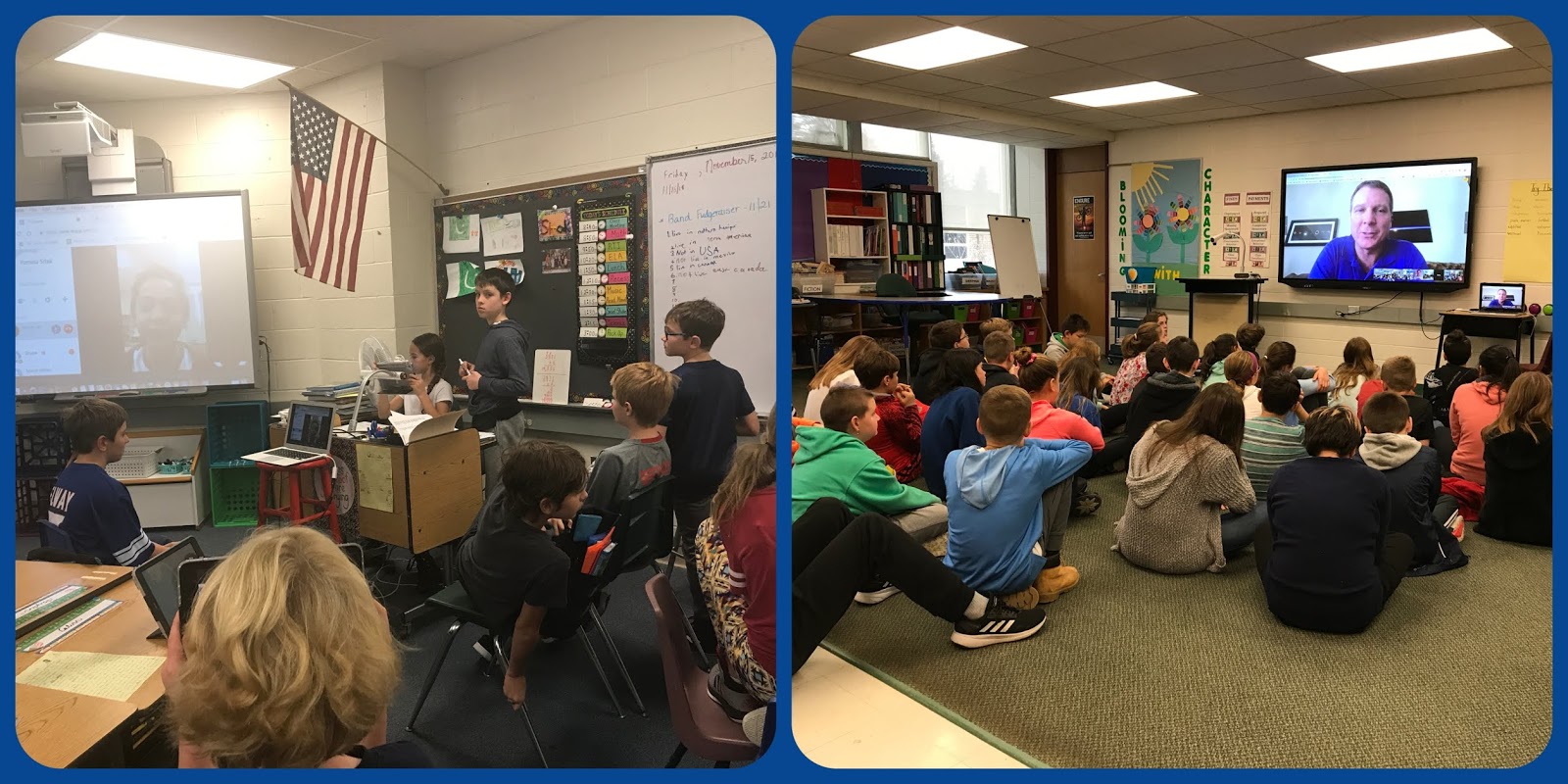
Classes in grades 4 & 6 used Skype and Google Hangouts for a mystery challenge with a class in Calgary, Canada & to hear from Astronaut Terry Virts through a National Geographic Live Speaker session:


Technology Essential Questions:
How does this digital tool help improve collaboration and/or communication?
How can technology be used to enhance a project and communicate knowledge?
How can we use this software to create original, innovative works and ideas?
 
2016 Massachusetts Digital Literacy and Computer Science (DLCS) Curriculum Framework:
3-5.CAS.c.4; 3-5.DTC.b; 3-5.CS.b.2; 3-5.CS.b.3; 3-5.CS.d.1; 6-8.CAS.a.4; 6-8.CAS.c.4; 6-8.DTC.a
Read More
  • Share This:  
  •  Facebook
  •  Twitter
  •  Google+
  •  Stumble
  •  Digg

Grade 6 Animation

 tháng 6 22, 2018     Google for Education, Grade 6     No comments   

Ms. Boyle's Class "Googl-ing" To the End of the Year

Students in Ms. Boyle's grade six classroom created one last project to wrap up the end of the school year.  Using Google Slides, they created stop action animation about the life cycle of the butterfly.  They shared their animations with their third grade buddies.
Check out these projects by Chase, Mia, Kate & Kenneth!


Technology Essential Questions:
Are there technological solutions or enhancements to supplement what is being taught?
How can we leverage technology to address the different needs, learning styles, interests and abilities of students?
How can we use this software to create original, innovative works and ideas?
Read More
  • Share This:  
  •  Facebook
  •  Twitter
  •  Google+
  •  Stumble
  •  Digg

Google Drawing

 tháng 5 04, 2018     Global Connections, Google Drawing, Grade 6     No comments   

Creating Infographics for the Sustainable Development Goals

Students in Ms. Stewart's grade 6 class have been studying and researching the Sustainable Development Goals.  As part of their investigation, students were tasked with writing an informative essay based on their findings and creating an infographic to visually represent the data they found.
Students searched the internet for "free" images and then used Google Drawing to create these attractive posters. Using Google Drawing, students inserted and modified images, text fields and backgrounds.  Students learned to arrange objects on the page and group them appropriately. 
Check out these impressive images:
Grade 6 Creating Infographics
Technology Essential Questions:

How can technology be used to enhance a project and communicate knowledge?
How can we use this software to create original, innovative works and ideas?
How can this digital tool help us create a project that sparks curiosity?

2016 Massachusetts Digital Literacy and Computer Science (DLCS) Curriculum Framework:
6-8.DTC.a.1-3; 6-8.DTC.b.1; 6-8.DTC.c
Read More
  • Share This:  
  •  Facebook
  •  Twitter
  •  Google+
  •  Stumble
  •  Digg

Blogging

 tháng 4 28, 2018     Global Connections, Grade 6, New Technology     No comments   

Using Technology to Write for an Authentic Audience

Students in Mrs. Valzania's grade 6 homeroom are getting ready to blog!  Last week, we spent time discussing blogging and writing for an audience outside of school.  Then each student setup a blog using Blogger.  Students learned to set permissions, comments, layout, theme, format, and sharing and then published their blogs on the internet.

Next steps will include posting their writing, adding images and links and responding to comments.

According to George Couros, author of The Innovator's Mindset, there are at least
five great reasons students should blog (article).
Blogging:
allows for "open reflection".
helps to "develop literacy through different mediums".
"gives students a space for their voice to be heard".
creates "an open archive of learning".
"develops a positive digital footprint".

Stay tuned for more about this exciting opportunity and be sure to watch out for our students' blogs as they flourish over the next few weeks.


Technology Essential Questions:
How does this digital tool help improve collaboration and/or communication?
How can we use this digital tool to create original, innovative works and demonstrate a student's unique voice?
How can we use this digital tool to address the different needs, learning styles, interests and abilities of students?

2016 Massachusetts Digital Literacy and Computer Science (DLCS) Curriculum Framework
6-8.CAS.a; 6-8.CAS.b; 6-8.DTC.a.3; 6-8.DTC.a.4; 6-8.DTC.b

Read More
  • Share This:  
  •  Facebook
  •  Twitter
  •  Google+
  •  Stumble
  •  Digg

Team Building Escape Room Style

 tháng 4 12, 2018     Collaboration, Grade 6     No comments   

BreakoutEDU

Thanks to the PTO's Teacher Wishes Program!

Over the past week, students in Mrs. Valzania's Social Studies classes have been participating in their first round of Breakout EDU's.  The topic of this Breakout EDU was map skills.

Breakout EDU is the immersive learning games platform. With Breakout EDU kits, you can turn your classroom into an academically-focused escape room and facilitate games where players use teamwork and critical thinking to solve a series of challenging puzzles
in order to open the locked box.


The fastest breakout clocked in at just 21 minutes!
Congratulations to Mrs. Magee's Homeroom Team Green:
Mrs. Magee's Homeroom Breaking Out!


Do you have what it takes to BREAKOUT?

Students left feedback about their experience on this Flipgrid:


Technology Essential Questions:
Why is exploration an important part of learning?
How can an "escape room" experience motivate students and inspire active participation?
How can an "escape room" experience inspire critical thinking, collaboration, communication & creativity?
How can we leverage a tool like Flipgrid to increase engagement and amplify student voice?

MA Common Core Standards:
Content Standards Social Studies: K.4.1; K.4.3; 1.2.3; 2.2.1
Read More
  • Share This:  
  •  Facebook
  •  Twitter
  •  Google+
  •  Stumble
  •  Digg

Global Reading Event

 tháng 3 02, 2018     Flipgrid, Global Connections, Grade 3, Grade 4, Grade 5, Grade 6     No comments   

Read Across America!
Read Across the World!
Happy Birthday, Dr. Seuss!


Today Spofford Pond students participated in Read Across America, "an annual reading motivation and awareness program that calls for every child in every community to celebrate reading on March 2, the birthday of beloved children's author Dr. Seuss.

Additionally, students shared book reviews on a global Flipgrid classroom.  Students left video book reviews (complete with #shelfies) of their favorite books and the reasons why they would recommend it to someone else.  This global Flipgrid classroom has over 4000 participants and is still growing!
Click here to check it out.

What a great way to share a love of reading on a global platform!


Technology Essential Questions:
How does this digital tool help improve collaboration and/or communication?
How can technology be used to enhance a project and communicate knowledge?
How can we leverage a tool like Flipgrid to increase engagement and amplify student voice?
How can we share our ideas on a global scale?

2016 Massachusetts Digital Literacy and Computer Science (DLCS) Curriculum Framework
3-5.CAS.a.3; 3-5.CAS.a.5; 3-5.CAS.b.1; 3-5.CS.C.4; 3-5.DTC.b
6-8.CAS.a.4; 6-8.CAS.a.5; 6-8.CAS.b.6; 6-8.DTC.a.1; 6-8.DTC.b

Read More
  • Share This:  
  •  Facebook
  •  Twitter
  •  Google+
  •  Stumble
  •  Digg

Safari Live!

 tháng 2 15, 2018     Global Connections, Grade 6, New Technology     No comments   


Grade 6 Students Go on Safari!

Social studies students in all three of Mrs. Valzania's 6th grade classes had a unique experience this week.  They travelled to Africa and rode on safaris in Kenya's Maasai Mara and South Africa's Kruger National Park.  Safari Live allows teachers and students to flatten the walls of their classroom and travel virtually alongside real life safari guides.
Through Skype, students can ask the guides questions in real time throughout the expedition.  Questions get posted live on the safari video feed and the guides speak directly to students to give their answers!
SPS 6th graders saw elephants, lions, monkeys, water buffalo and zebra during their trip.  They asked great questions and had transparent interactions with the safari guides.

How fantastic is that?


Technology Essential Questions:
Are there technological solutions or enhancements to supplement what is being taught?
Why is exploration an important part of learning?
How can a global, real-time experience motivate students and inspire active participation?
2016 Massachusetts Digital Literacy and Computer Science (DLCS) Curriculum Framework:
6-8.CAS.c.1; 6-8.DTC.a.1-2; 6-8.DTC.b.2; 6-8.CT.e.3
Read More
  • Share This:  
  •  Facebook
  •  Twitter
  •  Google+
  •  Stumble
  •  Digg

Google Sheets

 tháng 2 15, 2018     Google for Education, Grade 6     No comments   


6th Graders in Mrs. Sierpina's Science Classes Collect Data Using Google Sheets


For the beginning steps of their Science Fair projects, students in Mrs. Sierpina's science classes got an introduction to Google Sheets.  Students setup tables to collect their science experiment data.  Then, with the help of Google Sheets, they turned their data into charts so as to have a visual representation of the information they collected throughout their experiments.

For many students, this was their first experience with Google Sheets and digital data collection.  Until the Science Fair, students will continue to add information to their tables and charts, in preparation of presenting their findings at the fair.

Good Luck Grade 6 Scientists!


Google Sheets Essential Questions
How can this technology be used to enhance this science project and communicate knowledge?
What basic skills should students know about this digital tool?
How does this digital tool help students manage data?

2016 Massachusetts Digital Literacy and Computer Science (DLCS) Curriculum Framework:
6-8.CT.c
Read More
  • Share This:  
  •  Facebook
  •  Twitter
  •  Google+
  •  Stumble
  •  Digg

Google Drawing

 tháng 12 21, 2017     Google Drawing, Google for Education, Grade 6     No comments   

Six-Word Memoirs
(as written by book characters)


Recently, students in Mrs. Valzania's 6th grade classroom put their Google Drawing skills to work to create six-word memoir titles.  In just six words, students were asked to come up with a title for a memoir that might be written by one of the characters from the novels their literature circles just read.  Additionally, students had to include a image symbolic to the story or character.

Using Google Drawing, students inserted and modified word art and clipart, changed backgrounds, arranged objects on the page and grouped items appropriately.

Check out their finished projects:

By A.H.

By C.D.

By L.C.

By R.O.


Technology Essential Questions:

How can technology be used to enhance a project and communicate knowledge?

How can we use this software to create original, innovative works and ideas?

How can this digital tool help us create a project that sparks curiosity?


2016 Massachusetts Digital Literacy and Computer Science (DLCS) Curriculum Framework:
6-8.DTC.a.1-3; 6-8.DTC.b.1


Read More
  • Share This:  
  •  Facebook
  •  Twitter
  •  Google+
  •  Stumble
  •  Digg

Celebrating Computer Science Education Week

 tháng 12 10, 2017     Global Connections, Grade 3, Grade 4, Grade 5, Grade 6, Hour of Code     No comments   

Hour of Code 2017

In celebration of Computer Science Education Week (December 4-10, 2017) all classes at Spofford Pond Elementary School participated in an Hour of Code.  Hour of Code is a worldwide phenomenon that reaches tens of millions of students in almost 200 countries. Spofford Pond’s school wide coding event is just one of thousands that takes place during this week around the globe.

Spofford Pond teachers and students spent one hour trying various coding activities from the Hour of Code website and with iPad apps like Lightbot and Lightbot, Jr.  Teachers and students learned computer science skills, math skills, problem-solving and perseverance in each coding activity. They worked collaboratively and creatively to solve the puzzles and move through the programming lessons.

It was an exciting week of amazing discoveries, fun creations and confidence building exercises.


SPS Padlet of student feedback about the event:

Made with Padlet

See media coverage:  Tri Town Transcript - Boxford Wicked Local


Technology Essential Questions:
What are the fundamentals of computer programming?
How are algorithms used in coding?
How can you use computer programming to complete a task?
How is computer programming useful in real life?
How might you use computer programming in your future career?

2016 Massachusetts Digital Literacy and Computer Science (DLCS) Curriculum Framework:
3-5.CT.b; 3-5.CT.d; 6-8.CT.b; 6-8.CT.d

Read More
  • Share This:  
  •  Facebook
  •  Twitter
  •  Google+
  •  Stumble
  •  Digg

Grade 6 Gone Global

 tháng 10 15, 2017     Collaboration, Digital Citizenship, Global Connections, Grade 6     No comments   

Flat Connections

Students in Mrs. Valzania's grade 6 homeroom are participating in Flat Connections.  Flat Connections is a collaborative project for students.  Mrs. Valzania's students have joined the "A Week in the Life Project".  This project is available for students grade 3 - 6 around the world.  The objective of the project is for students to "connect, communicate, explore global topics and issues and share ideas and solutions through co-created digital artifacts." (flatconnections.com).

This week, Spofford students joined their Edmodo study groups and create digital handshakes using Flipgrid to introduce themselves and to meet their global classmates.  Students also learned about being good digital citizens, digital footprints and their digital legacy.

Participating schools, including Spofford Pond, are:  Yeh Wah School, China; Singapore American School, Singapore and Parkland District School, Pennsylvania, USA.  That's a total of over
150 students!  I am fortunate to be a co-teacher with Mrs. Valzania on this project as well.

Here are a few pictures of our sixth graders working on their Digital Handshakes:

Using Flipgrid to create a digital handshake with students around the world
Technology Essential Questions:
How does this digital tool help improve collaboration and/or communication?
What is your digital legacy?
What does it mean to be a global citizen?

2016 Massachusetts Digital Literacy and Computer Science (DLCS) Curriculum Framework
6-8.CAS.a.4; 6-8.DTC.a.2; 6-8.DTC.b.2; 6-8.DTC.b.3


Read More
  • Share This:  
  •  Facebook
  •  Twitter
  •  Google+
  •  Stumble
  •  Digg
Bài đăng cũ hơn Trang chủ

Đang tải...

Popular Posts

  • How to Remap Controller Buttons on the Nintendo Switch
    The Nintendo Switch makes it easy to change the button mapping of your controllers and save them to system-wide profiles that work in ...
  • Smartphone Using At The Supermarket Can Add 41% To Your Shopping Bill
    It is safe to say that you are always looking at your telephone when you're and about? Do you experience difficulty opposing the bait of...
  • How to Use the Custom Design Kiosk in ‘Animal Crossing: New Horizons’
    After you've unlocked the Able Sisters Tailor Shop in Animal Crossing: New Horizons , you will have access to a Custom Design Kios...
  • A Tool for Comparing Words
    I've just found this very useful tool that allows you to compare words and phrases and how they are used online. It works very simply by...
  • Forgot to post
    sorry travel day.  My bad! 
  • Publishing 3.0 - A new model for independent educational publishing
    My New Years resolution this year was to start work on a series of ebooks for iPads, e-readers and other digital devices. This has been my a...
  • Create Image Books
    I've always liked sites that take images and enable you to do something interesting with them. Pim Pam Pum seems to be a company that i...
  • VMware Workstation 15.5 Pro for Windows 5PC Lifetime License Key FAST DELIVERY
    VMware Workstation 15.5 Pro for Windows 5PC Lifetime License Key FAST DELIVERY Price : 1.40 Ends on : 4 days View on eBay
  • Things You Can Do With Your WebCam 1
    I'm beginning to think that besides the actual computer itself, a WebCam is one of the most fundamentally useful tools we can possibly h...
  • Using Wise Quotes with EFL ESL Students
    I've always found wise (and sometimes not so wise) quotes really useful, both within the classroom with students and as a way of introdu...

Bài đăng nổi bật

How To Swim and Dive in ‘Animal Crossing: New Horizons’

Nintendo Animal Crossing: New Horizons has received a free update that allows players to swim and dive for sea creatures for the firs...


Work freely with Fiverr

Work freely with Fiverr

Money with Adfly

Money with Adfly
Được tạo bởi Blogger.

Make Money MyLead

Make Money MyLead

TẢI PHIM 18+ VỀ ĐIỆN THOẠI Ở ĐÂY >>

Copyright © Software Development Process | Powered by Blogger
Design by Hardeep Asrani | Blogger Theme by NewBloggerThemes.com | Distributed By Gooyaabi Templates